Introduction
A Concrete Block Calculator is an essential planning tool for builders, masons, and DIY enthusiasts tackling wall projects. Whether you’re constructing a garden retaining wall, a foundation wall, a privacy screen, or a structural partition, this calculator quickly converts your wall dimensions and block specifications into the exact number of concrete masonry units (CMUs) you’ll need, the associated mortar volume, and the total material cost. By entering the wall’s length and height, the block face dimensions, the mortar joint thickness, and any openings for doors or windows, you eliminate manual arithmetic and avoid ordering too few or too many blocks. The Toolraxy Concrete Block Calculator also lets you apply a realistic waste factor for cuts and breakage, and, if you add a price per block, shows you the estimated block expense right away. All calculations happen privately in your browser, so you can plan your project with confidence on any device, from a smartphone at the lumber yard to a desktop in your workshop.
How to Use This Concrete Block Calculator
Enter the wall length and wall height in feet or meters.
Set the block size (length × height) in inches or centimeters, the default 16×8 inches matches a standard CMU.
Choose the mortar joint thickness (typically 3/8 inch or 10 mm).
Optionally, enter the number of doors and number of windows. When the count is greater than zero, additional fields will appear where you can specify the width and height of each door and window in feet.
Set the waste factor — a percentage (usually 5–10%) to account for broken blocks and off‑cuts.
Optionally, type the price per block to see the total block cost in your chosen currency.
The results update automatically; click Calculate if needed. Review the number of blocks (including waste), the net wall area, the mortar volume in cubic yards, and the total block cost. Use Copy or Share to save the estimate.
How the Tool Works
The calculator computes the number of concrete blocks based on the net face area of the wall and the effective area of one block, including the mortar joint. All dimensional calculations are performed in feet and inches for consistency.
Step‑by‑step formulas
Wall area (all dimensions converted to feet)
Gross Area (ft²) = Wall Length × Wall Height
For doors and windows, subtract their areas (each = width × height in ft).
Net Area = max(0, Gross Area – Total Opening Area)
Effective block dimensions (including mortar joint)
All block measurements are first converted to inches (1 cm = 0.3937 in).
Joint thickness is converted to inches (1 mm = 0.03937 in, default 0.375 in).
Effective Block Length (in) = Block Length + Joint Thickness
Effective Block Height (in) = Block Height + Joint Thickness
Block Face Area (ft²) = (Effective Length × Effective Height) ÷ 144
Number of blocks
Mortar volume (approximate)
A base factor of 0.03 cubic yards of mortar per 100 blocks is used for a standard 3/8‑inch joint.
If the joint thickness differs, the mortar volume is adjusted proportionally:
Joint Factor = Joint Thickness ÷ 0.375
Mortar (yd³) = (Blocks Needed ÷ 100) × 0.03 × Joint Factor
Total block cost
Edge cases handled
If wall length or height is zero or negative, all output fields show a warning.
When door or window counts are zero, no opening subtraction occurs, even if dimensions are filled.
The waste factor can be set between 0% and 25%.
Block count is always rounded up, so you never run short.
The mortar estimate assumes a single‑wythe wall and does not account for filling cores or grouting.
All monetary values are formatted with the selected currency symbol and two decimal places (JPY rounds to integers).
Worked Example
You’re building a 20‑foot‑long, 8‑foot‑high garden wall using standard 16″×8″ concrete blocks, a 3/8‑inch mortar joint, 5% waste, and no openings. Price per block: $1.80.
Gross wall area: 20 × 8 = 160 ft²
Effective block size: Length = 16 + 0.375 = 16.375 in, Height = 8 + 0.375 = 8.375 in
Block face area: (16.375 × 8.375) ÷ 144 ≈ 0.9523 ft²
Raw blocks: 160 ÷ 0.9523 ≈ 168.02
With 5% waste: Ceil(168.02 × 1.05) = Ceil(176.42) → 177 blocks
Mortar volume: (177 ÷ 100) × 0.03 × (0.375 ÷ 0.375) = 0.0531 yd³, displayed as 0.05 yd³
Total block cost: 177 × 1.80= 318.60
Interpretation
For this simple 20×8‑foot wall, you’ll need to purchase 177 standard concrete blocks and approximately 0.05 cubic yards of mortar. With the given price, the block cost comes to $318.60. The 5% waste buffer ensures you have enough material to cover cuts and accidental breakage, giving you a reliable shopping list for the materials supplier.
What Is a Concrete Block Calculator and Why Should You Use It?
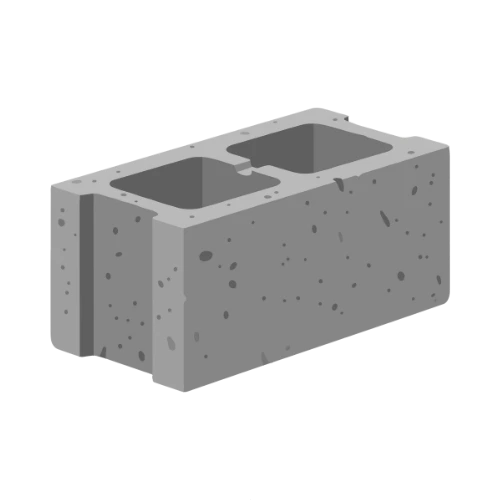
A concrete block calculator is a specialised tool that determines the exact number of concrete masonry units (CMUs), also known as cinder blocks or concrete blocks, required to build a wall of given dimensions. It factors in the block face area, mortar joint thickness, and any openings for doors and windows. Using one prevents the common mistake of underestimating material, which can interrupt a project, or over‑ordering, which wastes money. This calculator goes one step further by giving you an associated mortar volume estimate and a total cost, so you can budget accurately before you buy a single block.
What Is the Standard Concrete Block Size?
The most common concrete block size in residential construction is 8″ × 8″ × 16″ (height × depth × length). When calculating wall coverage, only the face dimensions — 8 inches high and 16 inches long matter because the depth (8 inches) determines the wall’s thickness but not the count. The calculator asks for length and height of the block face; the default 16″ length and 8″ height reflect this standard.
How Much Mortar Do I Need Per 100 Blocks?
A widely used rule of thumb is that 100 standard blocks with a 3/8‑inch mortar joint require approximately 0.03 cubic yards of mortar. This tool uses that benchmark and adjusts proportionally if your joint is thicker or thinner. Keep in mind that the number is an estimate and does not include mortar for filling cores or for below‑grade footings; it covers only the bedding and head joints.
What Is the Difference Between a Concrete Block and a Cinder Block?
Historically, cinder blocks were made with coal cinders and were lighter, but modern masonry units are almost exclusively concrete blocks made with Portland cement and aggregates. The terms are often used interchangeably. This calculator works for any standard rectangular masonry unit with the face dimensions you enter, including lightweight CMUs, dense concrete blocks, and even some split‑face architectural blocks.
Real‑World Example: Building a Detached Garage Wall
You need a wall that is 30 ft long and 10 ft high, using standard 16×8 blocks, 3/8″ joints, and with two windows, each 3×4 ft. Without waste, the calculator shows a net area of 276 ft² (300 – 24). That gives roughly 290 blocks with no waste. Adding 5% waste pushes the count to 305 blocks, a difference of 15 blocks. This quick check helps you order the correct pallet quantity and avoid an extra trip to the supplier.
Benefits of Using This Concrete Block Calculator
Saves time: No manual arithmetic or unit conversions; the tool handles everything.
Reduces manual errors: Automatic conversion of feet, meters, inches, and centimetres prevents measurement mix‑ups.
Instant results: Changes to any input instantly update block count, mortar, and cost.
Free and private: All computations happen in your browser — no project data is stored or sent online.
Accessible on any device: Use it on a phone at the job site or on a desktop while planning.
User‑focused: Clear, minimal interface with just the inputs you need for a quick material takeoff.
FAQs
How accurate is this concrete block calculator?
The calculator uses standard geometric formulas and the industry rule‑of‑thumb for mortar volume. It is highly accurate for estimating the number of blocks for a single‑wythe wall with the given dimensions and joint thickness. Actual needs can vary slightly due to bond pattern, corner details, or block variations, so always treat the output as a practical guide, not an exact requirement.
What is the standard mortar joint thickness for concrete blocks?
The typical mortar joint thickness is 3/8 inch (about 10 mm). This thickness provides a good balance between strength and workability. The calculator defaults to 3/8 inch, but you can enter any thickness that matches your project specifications.
Can I calculate the number of blocks for a retaining wall?
Yes. Enter the wall’s length and height as usual. For a retaining wall that may be thicker at the base, calculate each section separately if the height or thickness varies. This calculator only accounts for the wall’s face area, not its volume.
Does the calculator include mortar for the footing?
No. The mortar estimate only covers the bedding and head joints between blocks. Mortar for the footing or for filling cores is not included. You’ll need to estimate those separately.
How do I account for a different block size?
Simply change the block length and height inputs. You can also switch the unit to centimetres if you are working with metric blocks. The calculator will adjust the effective area automatically.
What if I have no doors or windows?
Leave the number of doors and windows at zero, and the size fields will remain hidden. The calculator will then use the full wall area without any deductions.
Why does the mortar volume change when I adjust the joint thickness?
Mortar volume is directly proportional to the joint thickness relative to the 3/8‑inch standard. A thicker joint means more mortar per block, so the estimate increases. The calculator uses a joint factor to adjust the base 0.03 yd³ per 100 blocks accordingly.
Is a waste factor really necessary?
Yes, it is recommended. Even in well‑managed projects, some blocks will be cut or damaged. A 5% waste factor adds a small buffer that prevents you from running short and having to reorder just a few blocks.
Can I use this calculator for bricks?
The calculator is optimised for concrete blocks, but it can be used for any rectangular masonry unit that covers a wall face with a mortar joint, such as clay bricks, if you adjust the block dimensions and joint thickness. However, it does not account for brick coursing or different bond patterns.
What unit should I use for wall dimensions?
You can enter feet or meters for length and height. The calculator converts everything to feet internally. Choose the unit that matches your plans; the output net wall area is always shown in square feet.
Does the calculator include sales tax?
No, the total block cost is the pre‑tax material cost. Multiply the result by your local tax rate to get the final amount if needed.
How should I interpret the mortar volume result?
The result is in cubic yards, which is the standard unit for ordering bulk mortar in the US. If you plan to mix your own mortar from sand and cement, you’ll need to convert cubic yards to the required bags of cement and sand. The calculator does not break down the mortar ingredients; it only gives the volume of mixed mortar.