Saving for one goal is straightforward. Saving for several at once, an emergency fund, a house down payment, a vacation, and retirement requires a system. The Savings Plan Calculator gives you that system by letting you define each goal, assign a monthly contribution, and see how every goal advances over time. It tracks your total monthly savings budget, warns you if your allocations exceed it, and displays each goal’s progress with its own timeline. A combined year-by-year projection shows how your total savings grow with compound interest. This tool is designed for individuals and families who want a single view of all their savings priorities. It supports 22 currencies, runs entirely in your browser, and keeps your financial data private.
How to Use the Savings Plan Calculator
Select your currency from the dropdown menu.
Set your annual interest rate and compounding frequency.
Enter your total monthly savings budget — the amount you can save each month across all goals.
Click Add Goal to create a new savings goal.
For each goal, enter a name, target amount, current saved, and monthly allocation.
Repeat until all your savings priorities are listed.
Remove any goal using the × button beside it.
Use the quick example buttons to load starter, family, aggressive, single, or retirement plans.
Click Calculate to refresh the plan.
Review the Plan Summary with total target, total saved, monthly allocated, and budget remaining.
Check the allocation bar to see how your monthly budget is split.
Review the goal progress cards for individual timelines and statuses.
Scroll down to the year-by-year total balance projection.
How the Savings Plan Calculator Formula Works
The calculator combines compound interest with multi-goal tracking.
Monthly Interest Rate:
Monthly Rate = Annual Interest Rate ÷ 12
Months to Goal (per goal):
Iteratively apply: Balance = Balance × (1 + Monthly Rate) + Monthly Allocation until the balance reaches the target.
Overall Progress:
Overall Progress = (Total Saved ÷ Total Target) × 100
Budget Remaining:
Budget Remaining = Total Monthly Budget − Sum of All Monthly Allocations
Year-by-Year Projection:
Balance(t) = Balance(t−1) × (1 + Monthly Rate) + Total Monthly Allocation
The calculator classifies your plan based on budget compliance, completion, and overall progress. Over-allocating your budget triggers a critical warning. Completing all goals earns the highest badge.
Worked Example
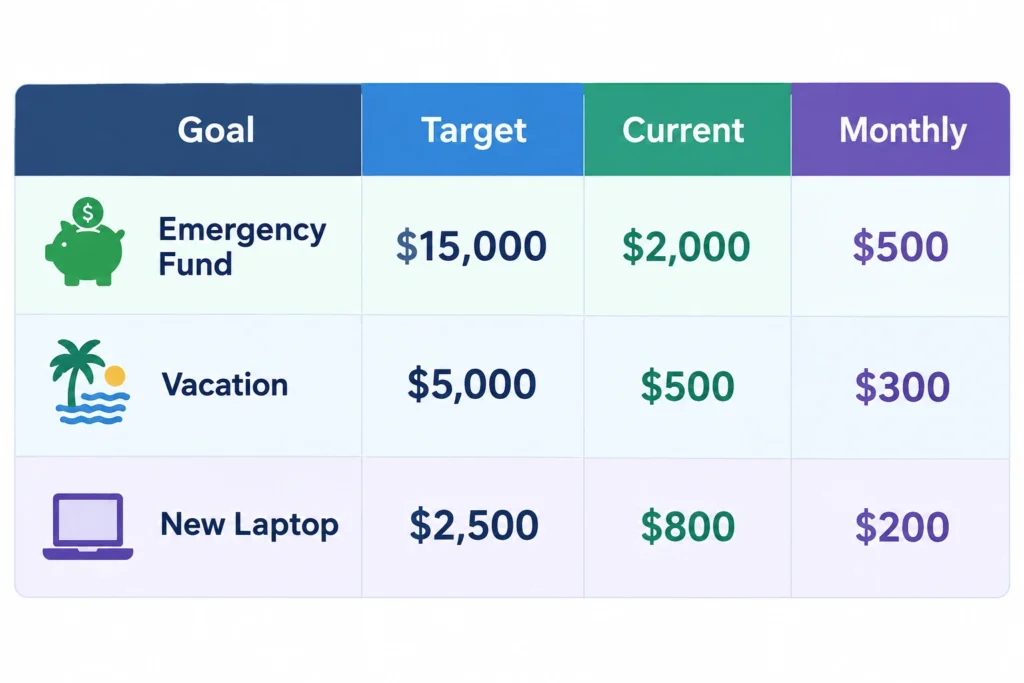
A saver has a monthly budget of $1,500 and three goals:
Step 1 – Totals:
Total target: $22,500
Total saved: $3,300
Monthly allocated: $1,000
Budget remaining: $1,500 − $1,000 = $500
Step 2 – Overall progress:
$3,300 ÷ $22,500 × 100 = 14.7%
Step 3 – Timelines (4.5% interest, monthly compounding):
Step 4 – Classification:
Overall progress below 15% and budget remaining positive → Early Stage ( ).
Step 5 – Recommendation:
You’re at the start of your savings journey (14.7% complete). Focus on consistency and automate your savings. You have $500 of unallocated budget — consider adding it to a goal.
Frequently Asked Questions
What is the Savings Plan Calculator and how does it work?
The Savings Plan Calculator is a multi-goal planner that tracks progress toward several savings targets. You enter your monthly budget, add goals with targets and monthly allocations, and the calculator shows individual timelines, overall progress, and a combined year-by-year projection.
How many goals can I track?
You can add as many goals as you need. The calculator dynamically creates a new card for each goal, and you can remove any goal with the × button. There is no hard limit.
What happens if my monthly allocations exceed my budget?
The calculator displays a critical “Over Budget” warning and shows the exact amount by which you exceed your budget. You should reduce allocations or increase your total savings budget.
How is compound interest handled?
The calculator uses monthly compounding for goal timelines and projections. You can also select a different compounding frequency for the initial principal, but monthly contributions are always compounded monthly.
Can I change the interest rate for individual goals?
No. The interest rate and compounding frequency apply to all goals. If you need different rates, you would need to use separate calculations.
What does the allocation bar show?
The allocation bar shows what percentage of your monthly savings budget goes to each goal. Hover over a segment to see the goal name, amount, and percentage.
How is the overall progress calculated?
Overall progress is the sum of all current savings divided by the sum of all target amounts, expressed as a percentage. It gives a quick snapshot of how far you’ve come across all goals combined.
Is the Savings Plan Calculator free?
Yes, it is completely free and runs in your browser. No registration or data submission is required.
What should I do if a goal is unreachable?
If a goal is marked “Unreachable,” it means the monthly allocation is zero or too small to reach the target within a reasonable timeframe. Consider increasing the allocation, reducing the target, or extending the timeline.
Can I use this calculator for retirement planning alongside other goals?
Yes. Many users include retirement as one goal among several. The calculator will show how retirement savings progress alongside shorter-term goals, helping you balance competing priorities.











 ).