
Find the ideal desk height, chair height, monitor position, and viewing distance from your body height. Sitting, standing, and adjustable desk modes.
| Measurement | Value | Notes |
|---|
| Quantity | Value | Formula | Notes |
|---|
| Position | Desk height | Eye height | Notes |
|---|
| Metric | Value | Notes |
|---|
| If your desk is... | Adjustment needed | What to do |
|---|
| Body height | Sitting desk | Standing desk | Chair seat |
|---|
| Metric | Value | Notes |
|---|
-
Select a citation style above. Click the citation text to select it all, then copy.
ADVERTISEMENT










Founder & CEO, Toolraxy
Faiq Ur Rahman is a web designer, digital product developer, and founder of Toolraxy, a growing platform of web-based calculators and utility tools. He specializes in building structured, user-friendly tools focused on health, finance, productivity, and everyday problem-solving.
User Ratings:
ADVERTISEMENT
ADVERTISEMENT
Ergonomic desk height is the work surface height that lets you sit or stand with your forearms roughly parallel to the floor and your shoulders relaxed. For sitting work, that’s roughly 42% of your body height. For standing work, it’s about 63%. The U.S. Occupational Safety and Health Administration (OSHA) frames the goal as neutral posture: elbows close to the body, head in line with the torso, and feet fully supported. A desk that is too high forces raised shoulders and extended arms. A desk that is too low causes you to bend your wrists and lean forward. The ANSI/HFES 100-2007 standard defines the anthropometric ranges that ergonomic furniture is designed to accommodate, and BIFMA G1-2013 translates those ranges into furniture sizing recommendations.
Desk height is not a single number. It interacts with chair seat height, monitor position, keyboard placement, and foot support. Lowering the chair to match a too-high desk can leave your feet dangling. Raising the chair to match a too-low desk can press the seat edge into your thighs. The calculator addresses this by returning all the related measurements together, so you can see how the pieces fit.
The two most common desk heights in North American offices are 29 and 30 inches (74 and 76 cm). Those numbers come from mid-twentieth-century military anthropometric data. They fit a narrow band of body heights well and everyone else poorly. Adjustable desks solve the problem, but they’re not universal. For fixed desks, the calculator tells you the gap and what to do about it.
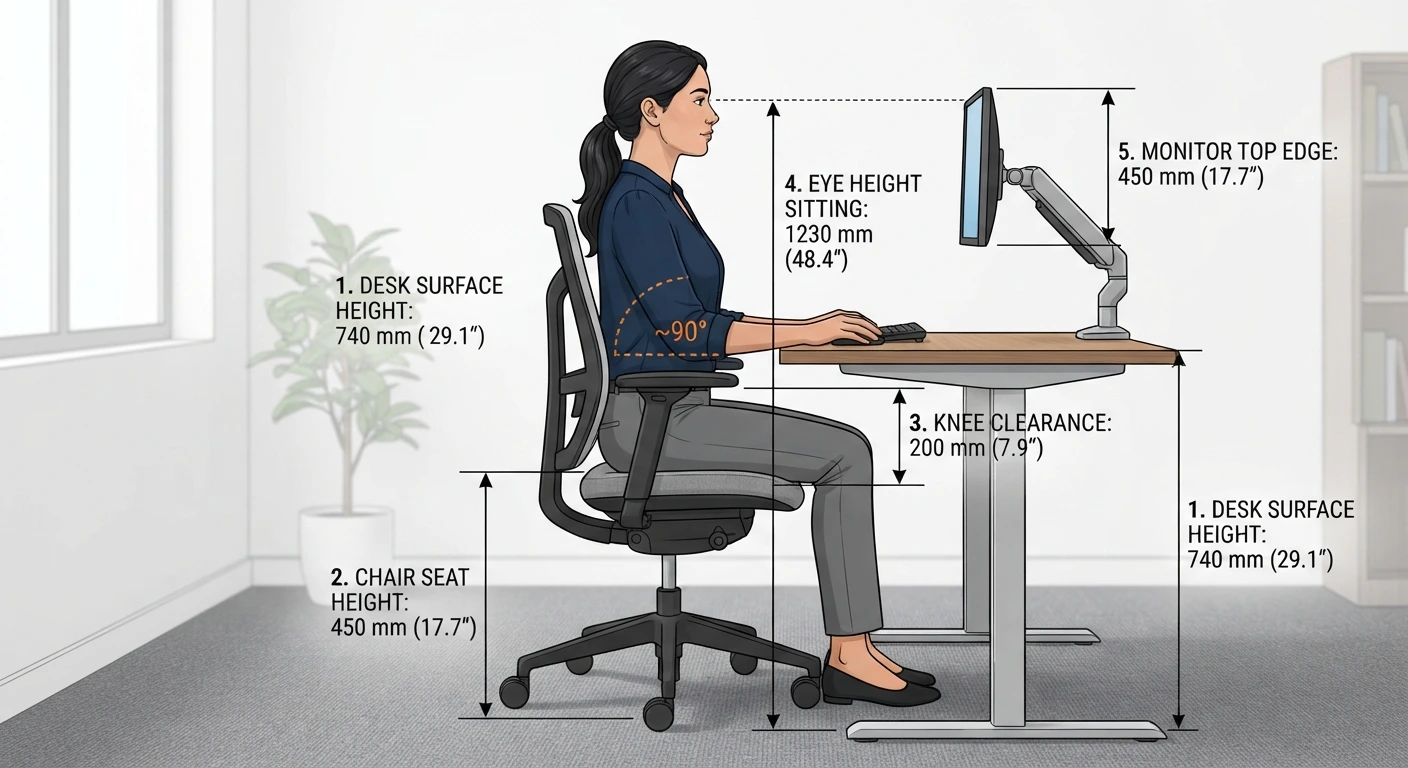
You calculate desk height by applying a body-ratio to your height. For sitting work, multiply your height by 0.42. For standing work, multiply by 0.63. A 175 cm person gets a 73.5 cm sitting desk and a 110.3 cm standing desk. The calculator handles the ratio, the shoe allowance, and the unit conversion.
Choose your unit system. Metric shows centimeters. Imperial shows inches. The tool converts your height internally and returns all measurements in your chosen unit.
Enter your body height. Use your height without shoes. If you normally wear shoes with a heel at your desk, add that separately. The input accepts a range from 120 cm to 230 cm (about 4’0″ to 7’6″).
Add your heel height if you wear shoes. A 2 cm heel changes the effective height used for all ratios. Leave it at zero if you work barefoot or in flat shoes. The maximum accepted value is 10 cm.
Choose your work mode. Sitting desk returns the seated setup. Standing desk returns the standing setup. Adjustable returns both sitting and standing heights so you can set the range on a sit-stand desk.
Enter your current desk height if you want a comparison. Measure from the floor to the top of your desk surface. The tool compares it against the ideal and tells you whether it fits, and by how much to adjust.
Read the hero result. The large number is your primary desk height for the selected mode. The context line below shows your body height, mode, and heel allowance.
Check the measurements table. Every ergonomic measurement is listed with its value and a note explaining what it controls: sitting desk, standing desk, chair seat, knee clearance, eye height sitting and standing, monitor viewing distance, and footrest recommendation.
Scan the reference table. Recommended sitting desk, standing desk, and chair seat heights are listed for body heights from 150 cm to 195 cm. Your height range is highlighted if it falls within 2.5 cm of a listed row.
The core formula is a single multiplication. Sitting desk height equals effective body height multiplied by 0.42. Standing desk height equals effective body height multiplied by 0.63. Chair seat height equals effective body height multiplied by 0.25. The ratios come from anthropometric research and the ranges published in ANSI/HFES 100-2007.
Formula: Sitting Desk Height = (Body Height + Heel) × 0.42
Formula: Standing Desk Height = (Body Height + Heel) × 0.63
Formula: Chair Seat Height = (Body Height + Heel) × 0.25
Formula: Eye Height Sitting = (Body Height + Heel) × 0.79
Formula: Eye Height Standing = (Body Height + Heel) × 0.93
The 0.42 sitting-desk ratio is close to the seated elbow height for most adults. The BIFMA G1-2013 standard recommends a height-adjustable range from 22.5 to 48.7 inches (57 to 124 cm) to accommodate the 5th to 95th percentile of the North American workforce. A fixed desk at 29 inches (74 cm) falls within that range but sits at the low end, which means shorter users have to raise their chairs and taller users have to lower them. OSHA recommends that work surfaces allow the monitor to sit at least 20 inches (50 cm) away and that clearance under the desk accommodate at least two seated postures.
The monitor viewing distance is a range, not a fixed number. The calculator returns 50 to 75 cm (about 20 to 30 inches) with an ideal value of 60 cm (about 24 inches), which aligns with OSHA’s minimum of 20 inches and the common ergonomic recommendation of roughly one arm’s length.
A user is 168 cm tall and wears shoes with a 3 cm heel at the office. She works at a sitting desk and wants to know whether her current desk at 74 cm is the right height.
Step 1. Effective height = 168 + 3 = 171 cm.
Step 2. Sitting desk height = 171 × 0.42 = 71.8 cm.
Step 3. Chair seat height = 171 × 0.25 = 42.8 cm.
Step 4. Eye height sitting = 171 × 0.79 = 135.1 cm.
Step 5. Standing desk height = 171 × 0.63 = 107.7 cm.
Step 6. Eye height standing = 171 × 0.93 = 159.0 cm.
Step 7. Knee clearance = 71.8 − 42.8 = 29.0 cm.
Step 8. Monitor viewing distance = 60 cm ideal (range 50–75 cm).
Step 9. Compare current desk. Current desk = 74 cm. Ideal = 71.8 cm. Difference = +2.2 cm. The desk is slightly too high.
Interpretation. The fit status is “Close fit” because the difference is within 5 cm. The advice is to lower the desk by 2.2 cm or raise the chair slightly. If the desk is fixed and cannot be lowered, raising the chair by 2.2 cm would put the seat at 45 cm, which is above her ideal 42.8 cm. She would then need a footrest to keep her feet supported. This is the kind of trade-off the calculator surfaces: fixing one measurement often requires adjusting another.
Sitting and standing desk heights serve different body positions but follow the same principle: the work surface should sit at elbow height for the position you’re in. Sitting elbow height is roughly 42% of body height. Standing elbow height is roughly 63%. The difference is the 21% of body height that disappears when you sit down.
| Dimension | Sitting Desk | Standing Desk |
|---|---|---|
| Surface height ratio | 0.42 × body height | 0.63 × body height |
| Elbow position | Seated elbow height | Standing elbow height |
| Foot support | Chair and floor or footrest | Floor or anti-fatigue mat |
| Knee clearance | Required (roughly 29 cm for average) | Not applicable |
| Monitor top edge | At seated eye height (0.79 × body height) | At standing eye height (0.93 × body height) |
| Typical height for 175 cm | 73.5 cm | 110.3 cm |
| BIFMA G1-2013 adjustability range | 22–30 inches (56–76 cm) | 38–48 inches (97–122 cm) |
| Common failure mode | Desk too high, feet dangle | Desk too low, wrists bend upward |
The BIFMA G1-2013 standard recommends a combined adjustability range of 22.5 to 48.7 inches (57 to 124 cm) to cover both sitting and standing for the 5th to 95th percentile of users. A sit-stand desk that only reaches 45 inches (114 cm) will be too low for a 195 cm user in standing mode. The calculator’s standing desk output gives you the target to check against the desk’s published range.
The Mayo Clinic recommends raising the chair if a desk is too high and cannot be adjusted, then adding a footrest if the feet no longer reach the floor. For standing desks that are too low, desk risers or a taller desk are the options. The calculator’s adjustment guide table covers both cases.
Your body height sets the baseline, but several other factors move the ideal desk height up or down. Shoe heel height, chair cushion thickness, monitor size, and the type of work you do all change what fits.
Body height. The primary input. Taller people need higher desks in both sitting and standing modes. The relationship is linear: a 5 cm increase in body height adds 2.1 cm to the ideal sitting desk height.
Shoe heel height. A 3 cm heel raises your effective height by 3 cm, which adds 1.3 cm to the ideal sitting desk and 1.9 cm to the ideal standing desk. If you wear different shoes on different days, the desk height that fits one pair may not fit another.
Chair cushion thickness and compression. A thick, soft cushion compresses under your weight, lowering your effective seated height. A firm cushion holds you higher. The calculator assumes the chair seat height is the top of the compressed cushion, not the uncompressed surface.
Keyboard and mouse placement. If you use a keyboard tray, the desk surface height matters less because your hands are at the tray height. The tray should sit at seated elbow height. A desk without a tray needs to sit at elbow height directly.
Monitor size and position. A larger monitor may need to sit farther away, which changes the vertical angle to the top edge. The calculator returns the monitor top edge at eye height, which is the OSHA recommendation for a neutral neck posture.
Footrest requirement. If the ideal chair seat height is below the lowest setting of a standard chair (roughly 40 cm), a footrest becomes necessary to keep the feet supported. The calculator flags this in the measurements table.
Task type. Work that requires frequent writing or reading on paper may need a slightly higher surface than keyboard work. Writing uses the whole forearm; typing uses the hands and wrists. The calculator’s sitting desk height targets keyboard and monitor work.
Sit-stand ratio. For adjustable desks, the height matters less than the switching pattern. A 2025 randomized trial found that a fixed 30 minutes sitting to 15 minutes standing ratio reduced lower back pain more effectively than a personalized self-selected ratio. The desk needs to reach both heights accurately, but the benefit comes from using both.
A correct desk height is the starting point. These tips come from OSHA workstation guidance, Mayo Clinic office ergonomics recommendations, and common failure modes in home office setups.
Measure your desk before you buy anything. Measure from the floor to the top of the desk surface, not the underside or the frame. A desk listed as “30 inches” may measure 29.5 or 30.5 depending on the manufacturer.
Set the chair first, then the desk. The chair seat height should let your feet rest flat on the floor with your thighs roughly horizontal. Once the chair is right, adjust the desk to match your seated elbow height. If the desk can’t move, a keyboard tray or a footrest fills the gap.
Use the 90-degree check. Sit back in your chair. Your elbows should rest at roughly 90 degrees with your forearms parallel to the floor. If your elbows are higher than 90 degrees, the desk is too low. If they’re lower, the desk is too high.
Keep the monitor top edge at eye level. OSHA recommends the top of the screen at or slightly below eye level. If you wear bifocals or progressive lenses, lower the monitor by 2 to 3 inches so you’re looking through the middle of the lens, not the bottom.
Put the monitor at least 20 inches away. OSHA sets 20 inches (50 cm) as the minimum viewing distance. The calculator returns 50 to 75 cm with an ideal of 60 cm. If you can’t read the screen at 50 cm, increase the font size instead of moving closer.
Add a footrest if your feet dangle. When the desk is too high and the chair has to be raised, the feet lose floor contact. A footrest restores support and reduces pressure on the back of the thighs.
Alternate sitting and standing every 30 to 60 minutes. A 2025 randomized trial found that a 30:15 sitting-to-standing ratio was more effective than a personalized self-selected ratio for reducing lower back pain. Use a timer or a desk reminder until the pattern becomes habit.
Check the desk’s adjustability range before buying a sit-stand desk. A desk that maxes out at 45 inches will be too low for a 195 cm user in standing mode. The calculator’s standing desk output is the number to compare against the desk’s published maximum height.
Multiply your body height by 0.42 for a sitting desk and by 0.63 for a standing desk. A 175 cm person gets a 73.5 cm sitting desk and a 110.3 cm standing desk. Add your shoe heel height to your body height before multiplying if you wear shoes with a heel.
A 5’9″ (175 cm) person gets a sitting desk height of 73.5 cm (28.9 inches) and a standing desk height of 110.3 cm (43.4 inches). The chair seat height is 43.8 cm (17.2 inches).
The sitting desk sits at seated elbow height, roughly 42% of body height. The standing desk sits at standing elbow height, roughly 63% of body height. For a 175 cm person, the difference is about 37 cm (14.5 inches).
Most North American desks are 29 to 30 inches (74 to 76 cm) tall. That height fits a person around 175 cm (5’9″) well. It is too high for shorter users and too low for taller users. Adjustable desks cover a wider range.
Sit at your desk with your feet flat on the floor. If your elbows are below 90 degrees or your shoulders are raised, the desk is too high. OSHA recommends elbows close to the body with forearms roughly parallel to the floor.
The top of the monitor should sit at or slightly below eye level when you’re sitting or standing in your normal working posture. OSHA recommends this position to keep the neck in a neutral alignment. If you wear bifocals, lower the monitor a few inches.
OSHA recommends a minimum viewing distance of 20 inches (50 cm). Most ergonomic guidance puts the ideal range at 50 to 75 cm (20 to 30 inches) with about 60 cm (24 inches) as a comfortable target. The calculator returns this range.
The chair seat height should let your feet rest flat on the floor with your thighs roughly horizontal. For most people, that’s about 25% of body height. A 175 cm person gets a 43.8 cm seat height. If the seat is higher than that and your feet dangle, a footrest helps.
A footrest is generally not needed with a standing desk because your feet are on the floor. A footrest is needed with a sitting desk when the chair is raised to match a too-high desk and the feet no longer reach the floor. The calculator flags this in the measurements table.
A 2025 randomized trial found that a fixed 30 minutes sitting to 15 minutes standing ratio was more effective than a self-selected ratio for reducing lower back pain. Alternating every 30 to 60 minutes is a practical target. Use a timer until the pattern becomes habit.
The calculator accepts body heights from 120 cm upward, so it can be used for older children and teenagers. For younger children, children’s furniture sizing charts use different ratios and safety considerations. The tool’s output is a starting point, not a substitute for a child-specific fit.
This calculator provides estimates for educational purposes.
U.S. Occupational Safety and Health Administration, “Computer Workstations eTool – Desks,” 2024. https://www.osha.gov/etools/computer-workstations/components/desks
U.S. Occupational Safety and Health Administration, “Computer Workstations eTool – Positions,” 2024. https://www.osha.gov/etools/computer-workstations/positions
Human Factors and Ergonomics Society, “ANSI/HFES 100-2007: Human Factors Engineering of Computer Workstations,” 2007. https://www.hfes.org/
BIFMA, “BIFMA G1-2013: Ergonomics Guideline for Furniture Used in Office Work Spaces,” 2013. https://www.bifma.org/
UC Berkeley Ergonomics Program, “Ergonomics Guidelines for Computer Workstations,” citing ANSI/HFES 100-2007. https://uhs.berkeley.edu/
Cornell University Ergonomics Web, “Computer Workstation Ergonomic Checklist,” 2024. https://ergo.human.cornell.edu/
Mayo Clinic, “Office ergonomics: Your how-to guide,” 2023. https://www.mayoclinic.org/
Brakenridge, C.L., et al., “Do fixed or personalised sit-stand desk ratios improve lower back pain? A randomised trial,” Applied Ergonomics, 2026. https://www.sciencedirect.com/
Duke University Occupational and Environmental Safety, “Standards for Computer Workstations,” citing ANSI/HFES 100-2007. https://www.safety.duke.edu/
ADVERTISEMENT
ADVERTISEMENT