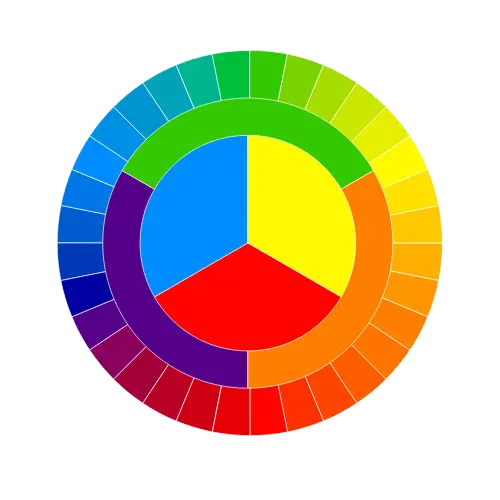

RGB color space or RGB color system, constructs all the colors from the combination of the Red, Green and Blue colors.
The red, green and blue use 8 bits each, which have integer values from 0 to 255. This makes 256*256*256=16777216 possible colors.
RGB ≡ Red, Green, Blue
Each pixel in the LED monitor displays colors this way, by combination of red, green and blue LEDs (light emitting diodes).
When the red pixel is set to 0, the LED is turned off. When the red pixel is set to 255, the LED is turned fully on.
Any value between them sets the LED to partial light emission.
RGB code has 24 bits format (bits 0..23):
RGB = (R × 65536) + (G × 256) + B , (when R is RED, G is GREEN and B is BLUE)
| Color | HTML / CSS Name | Hex Code #RRGGBB | Decimal Code (R,G,B) |
|---|
| Color | Color Name | Hex Code #RRGGBB | Decimal Code R,G,B |
|---|
ADVERTISEMENT

Founder & CEO, Toolraxy
Faiq Ur Rahman is a web designer, digital product developer, and founder of Toolraxy, a growing platform of web-based calculators and utility tools. He specializes in building structured, user-friendly tools focused on health, finance, productivity, and everyday problem-solving.
User Ratings:
ADVERTISEMENT
The RGB Color Codes Chart is an interactive online tool that helps you explore, select, and understand RGB colors. Whether you’re a web designer choosing website colors, a graphic designer creating digital art, a developer implementing CSS styles, or a student learning color theory, this tool provides instant access to RGB values, HEX codes, and visual color samples. Use the sliders to mix custom colors, click any color swatch to capture its code, or browse through comprehensive color tables with HTML/CSS names. The chart includes 100+ color swatches, basic and extended color tables, and detailed explanations of RGB color space and calculation formulas.
Follow these steps to find and use RGB colors:
Adjust RGB Sliders: Drag the Red (R), Green (G), and Blue (B) sliders (0–255) to mix your desired color.
View Real-Time Preview: The color box updates instantly as you adjust sliders.
Read HEX Code: The hexadecimal color code (e.g., #DE4545) displays below the color box.
Copy the Value: Use the displayed HEX or RGB values in your design or code.
Hover Over Colors: Move your cursor over any color square in the chart grid.
View Color Info: The hover information panel displays the HEX code and RGB values for that color.
Click to Select: Click any color swatch to load it into the color picker for further adjustment.
Browse Basic Colors: Click the “Basic colors” toggle to expand the table of 16 standard HTML/CSS colors.
Browse Extended Colors: Click the “Extended colors” toggle to explore 40 additional named colors.
Select from Tables: Click any row in either table to instantly load that color into the picker.
View Color Samples: Each row includes a color sample square showing the actual color.
The RGB Color Codes Chart combines interactive JavaScript controls with pre-defined color data to provide a comprehensive color reference system.
RGB (Red, Green, Blue) is an additive color model where colors are created by combining red, green, and blue light. Each color channel uses 8 bits, allowing values from 0 to 255 (256 possible values per channel). This creates 256 × 256 × 256 = 16,777,216 possible colors—the full 24-bit color space used by computer monitors and digital displays.
RGB Decimal Format: rgb(red, green, blue) where each value ranges from 0–255
Example: rgb(222, 69, 69) produces a medium red
HEX Format: #RRGGBB where RR, GG, BB are hexadecimal values (00–FF)
Example: #DE4545 (DE hex = 222 decimal, 45 hex = 69 decimal)
Conversion Formula:
HEX = (R × 65536) + (G × 256) + B
Where 65536 = 16⁴ and 256 = 16²
Examples from the tool:
White: (255 × 65536) + (255 × 256) + 255 = #FFFFFF
Blue: (0 × 65536) + (0 × 256) + 255 = #0000FF
Red: (255 × 65536) + (0 × 256) + 0 = #FF0000
Green: (0 × 65536) + (255 × 256) + 0 = #00FF00
Gray: (128 × 65536) + (128 × 256) + 128 = #808080
Yellow: (255 × 65536) + (255 × 256) + 0 = #FFFF00
RGB colors use a 24-bit format organized as:
RED[7:0]   GREEN[7:0]   BLUE[7:0]
23......16 15......8    7......0
Bits 23–16: Red channel (8 bits)
Bits 15–8: Green channel (8 bits)
Bits 7–0: Blue channel (8 bits)
Color Picker Logic:
Three range sliders (0–255) control red, green, and blue values
JavaScript reads slider values on input events
Updates color preview background using rgb(${red}, ${green}, ${blue})
Converts decimal values to hexadecimal using toString(16).toUpperCase()
Pads single-digit hex values with leading zero
Color Chart Grid:
108 pre-defined color swatches arranged in a responsive grid
Hover events trigger updateHoverInfo() to parse and display color codes
Click events set the color picker values using parseInt(colorHex.slice(1, 3), 16)
Color Tables:
Basic colors array contains 16 standard HTML/CSS colors
Extended colors array contains 40 additional named colors
Click handlers convert HEX to RGB using string parsing
Visual color samples use inline background-color styling
Let’s walk through a practical example of finding a specific color for a website design.
Scenario: You need a medium-dark teal color for your website’s header background.
Method 1 – Using the Color Picker:
Start with approximate values: Red=0, Green=128, Blue=128 (standard teal)
Adjust Green slider to 100 (slightly darker)
Adjust Blue slider to 110 (slightly more blue)
Result: RGB(0, 100, 110) = #00646E
Method 2 – Using the Color Chart:
Hover over the color chart swatches until you find a teal-like color
The hover info shows #008080 (standard teal)
Click the swatch to load it into the picker
Fine-tune using sliders to achieve exact desired shade
Method 3 – Using Color Tables:
Expand the Basic colors table
Find “Teal” row with hex #008080
Click the row to load the color
Adjust as needed
Result: You now have the exact RGB and HEX values to use in your CSS:
.header {
  background-color: #00646E;  /* or rgb(0, 100, 110) */
}
RGB color space is a method of representing colors as combinations of red, green, and blue light. It’s the foundation of all digital displays—computer monitors, televisions, smartphones, and projectors all use RGB technology. Each pixel on an LED monitor contains three tiny light-emitting diodes (LEDs): one red, one green, and one blue. By varying the intensity of each LED, the monitor can display any color within its gamut.
Web Development: CSS supports both RGB (rgb(255, 0, 0)) and HEX (#FF0000) color formats. Understanding RGB helps developers implement consistent color schemes across websites and applications.
Graphic Design: Digital design tools (Photoshop, Illustrator, Figma) use RGB as their primary color model. Designers must understand RGB to create graphics that display accurately on screens.
User Interface Design: UI designers use RGB to create accessible color combinations with sufficient contrast for readability and usability.
Brand Consistency: Maintaining exact RGB values ensures brand colors appear consistently across all digital platforms—websites, social media, email campaigns, and digital advertising.
Accessibility: Understanding RGB helps designers meet WCAG contrast requirements by calculating luminance and contrast ratios between text and background colors.
Each pixel on a modern display contains subpixels for red, green, and blue. The display controller sends digital values (0–255) to each subpixel, determining how brightly it illuminates. When viewed from a normal distance, these three colored lights blend together to create the perception of a single color.
Black (0,0,0): All subpixels off—no light emitted
White (255,255,255): All subpixels at maximum intensity
Gray (128,128,128): All subpixels at half intensity
Pure Red (255,0,0): Only red subpixel illuminated
Web Design:
Selecting brand color palettes
Creating gradient backgrounds
Designing accessible color schemes
Implementing dark/light mode themes
Developing CSS frameworks
Digital Marketing:
Ensuring brand color consistency across ads
Creating visually appealing email templates
Designing social media graphics
Optimizing images for web display
Mobile App Development:
Defining app theme colors
Creating custom UI components
Implementing dark mode support
Designing icon sets
Data Visualization:
Creating color-coded charts
Developing heat maps
Designing infographics
Ensuring data accessibility
Game Development:
Defining character and environment colors
Creating particle effects
Implementing lighting systems
Designing user interfaces
Interactive Picker: Mix custom colors with real-time RGB and HEX display
100+ Color Swatches: Hover and click to explore and select colors instantly
Comprehensive Tables: 56 named colors with HTML/CSS references
Instant Conversion: RGB to HEX conversion happens automatically as you adjust sliders
Click-to-Select: Any color swatch or table row loads into the picker
Educational Content: Includes RGB space explanation, bit structure, and calculation formulas
Mobile Responsive: Grid adjusts from 12 columns on desktop to 6 columns on mobile
No Installation: Works entirely in browser—no downloads required
Free Forever: No registration, subscriptions, or hidden costs
Reference Examples: Formula examples for white, blue, red, green, gray, and yellow
Visual Color Samples: Color swatches next to each table entry for easy identification
Collapsible Tables: Toggle basic and extended color tables to save space
RGB stands for Red, Green, Blue. It’s an additive color model where colors are created by combining different intensities of red, green, and blue light. Each channel ranges from 0 to 255.
Use the formula: HEX = (R × 65536) + (G × 256) + B. Convert each decimal value to two-digit hexadecimal. Example: RGB(222,69,69) → DE,45,45 → #DE4545.
With 8 bits per channel (0–255), there are 256 × 256 × 256 = 16,777,216 possible RGB colors. This is known as “true color” or 24-bit color.
RGB uses decimal values (0–255) for each channel, while HEX uses hexadecimal (00–FF). Both represent the same colors—RGB is easier to understand mathematically, while HEX is more compact for CSS.
Use rgb(red, green, blue) with values 0–255, or #RRGGBB for hex. Example: color: rgb(255, 0, 0); or color: #FF0000; both produce red.
#FFFFFF means Red=255, Green=255, Blue=255—pure white. Each FF in hex equals 255 in decimal.
Black is RGB(0, 0, 0) or #000000—all channels at minimum intensity.
White is RGB(255, 255, 255) or #FFFFFF—all channels at maximum intensity.
Use the color picker in graphic software (Photoshop, GIMP) or browser developer tools. Some browser extensions can also sample colors from web pages.
ADVERTISEMENT