A
#FF0000
B
#0000FF
Mix
#7F007F
Mixing method
RGB average
The mixed color is computed as the average of each RGB component. This is simple additive mixing (like light). For paint mixing, results will differ.


Founder & CEO, Toolraxy
A color mixer is a tool that combines two or more colors to produce a resulting color. This specific color mixer uses RGB arithmetic mean—it takes two colors and calculates the mathematical average of their red, green, and blue components.
Unlike physical paint mixing (which is subtractive), this tool models additive color mixing—how light behaves. When you shine a red light and a blue light on the same spot, you get magenta. That’s exactly what this tool shows: red + blue = magenta (#FF0000 + #0000FF = #7F007F).
The result is always the perfect mathematical midpoint between your two chosen colors.
Color mixing seems simple, but it’s surprisingly unintuitive. What do you get when you mix purple and orange? What about teal and crimson? Guessing rarely works.
For Digital Artists:
Understanding how RGB values combine helps you predict outcomes before you commit pixels. No more trial and error.
For Designers:
Need a color that bridges two brand colors? This tool finds the exact midpoint—perfect for gradients, hover states, and UI transitions.
For Students:
Color theory comes alive when you see results instantly. Experiment with complementary colors, warm/cool combinations, and color relationships.
For Everyone:
Curious what happens when you mix your favorite colors? Now you know—instantly, mathematically, accurately.
Step 1: Choose Your First Color (Color A)
Use the color picker for visual selection
OR type a hex code directly (e.g., #FF5733)
The swatch updates instantly
Step 2: Choose Your Second Color (Color B)
Repeat the process with your second color
Both swatches show your selections
Step 3: View the Mixed Result
The Mixed swatch appears automatically
The hex code below shows the exact result
Step 4: Copy and Use
Click “Copy HEX” to copy the mixed color
Paste into your design software, CSS, or documentation
That’s it. No sliders, no settings—just pure color averaging.
Every color on screen is three numbers: Red, Green, Blue (0-255 each).
Color A: (R₁, G₁, B₁)
Color B: (R₂, G₂, B₂)
Mixed Color:
R_mixed = (R₁ + R₂) ÷ 2
G_mixed = (G₁ + G₂) ÷ 2
B_mixed = (B₁ + B₂) ÷ 2
Each result rounds to the nearest whole number (since RGB values must be integers 0-255).
Mix Red (#FF0000) and Blue (#0000FF):
Red A: 255, Green A: 0, Blue A: 0
Red B: 0, Green B: 0, Blue B: 255
Calculate:
Red mixed = (255 + 0) ÷ 2 = 127.5 → 128
Green mixed = (0 + 0) ÷ 2 = 0
Blue mixed = (0 + 255) ÷ 2 = 127.5 → 128
Result: RGB(128, 0, 128) = #800080 (purple/magenta)
This is additive color mixing. Red light + blue light = magenta. Green light + red light = yellow. This matches how screens work—each pixel combines red, green, and blue subpixels at varying intensities.
Scenario: You’re designing a website with a navy blue (#000080) primary color and a gold (#FFD700) accent color. You need a third color that bridges both—perhaps for a gradient or a hover state.
Input:
Color A: #000080 (navy)
Color B: #FFD700 (gold)
RGB Breakdown:
Navy: R=0, G=0, B=128
Gold: R=255, G=215, B=0
Calculation:
R = (0 + 255) ÷ 2 = 127.5 → 128
G = (0 + 215) ÷ 2 = 107.5 → 108
B = (128 + 0) ÷ 2 = 64
Result: #806C40 (a warm olive-brown)
This color now bridges your navy and gold perfectly—dark enough to complement navy, warm enough to relate to gold.
 Instant Results – No waiting, no calculations, no guesswork
Dual Input Methods – Visual pickers for designers, hex input for developers
One-Click Copy – Grab the mixed hex code instantly
Clean Interface – Focus on colors, not distractions
Mobile Friendly – Works on phones, tablets, and desktops
Educational – See color theory in action
Privacy First – All calculations in your browser, no data sent anywhere
Completely Free – No signups, no limits, no hidden costs
Digital Artists
Predict how colors will blend in digital painting software. Understand what happens when you overlay semi-transparent colors.
UI/UX Designers
Find the perfect middle ground between two interface colors. Create harmonious color systems with predictable relationships.
Web Developers
Need a hex code that sits between two brand colors? Get it instantly, ready for CSS.
Graphic Designers
Explore color combinations for logos, illustrations, and branding materials without leaving your workflow.
Students of Color Theory
Experiment with complementary, analogous, and contrasting color pairs. Watch the math happen in real time.
Hobbyists & Curious Minds
Ever wondered what pink and orange make? Now you can find out in seconds.
Mistake #1: Confusing Additive and Subtractive Mixing
This tool models light (additive). Red + Blue = Magenta in light. But in paint (subtractive), red + blue = purple. Different models, different results. Know which one you need.
Mistake #2: Expecting Paint-like Results
If you’re mixing physical paint, this tool won’t match your experience. Paint mixing is complex—pigments, opacity, and medium all affect results. Use this for digital work.
Mistake #3: Forgetting RGB Is Linear
Human perception isn’t perfectly linear. The mathematical average may not look like the “visual average” to your eye. This is normal—it’s mathematically correct even if perception differs.
Mistake #4: Invalid Hex Formats
Always use proper hex: #RRGGBB or #RGB. The tool accepts both but expects valid hexadecimal characters.
Mistake #5: Expecting Surprising Results
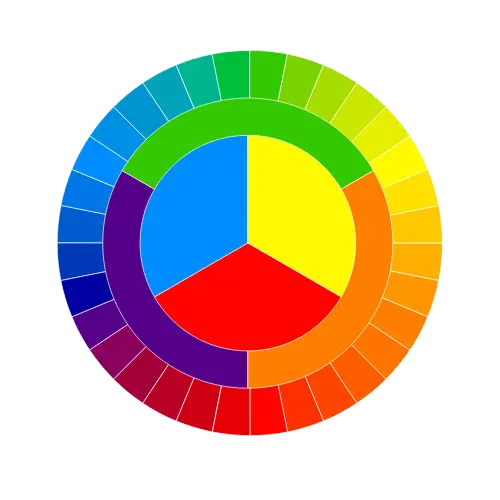
RGB averaging always produces a color between your inputs. It can’t create colors outside that range. Want wild results? Try complementary colors (opposite on the color wheel).
50/50 Mix Only
This tool mixes colors in equal proportion (50% each). For weighted mixing (e.g., 70/30), use a gradient generator with adjustable steps.
Additive Model Only
This is RGB light mixing, not paint mixing. For physical media, results will differ significantly.
Two Colors Maximum
Only two colors can be mixed at once. For three or more colors, you’ll need sequential mixing or a palette generator.
No Transparency
Alpha channels (RGBA) are not supported. The tool handles only solid, opaque colors.
RGB Space Only
Mixing happens in RGB, not in perceptually uniform spaces like LAB. This matches how screens work but may not match human perception perfectly.