Color Palette Generator

Color Palette Generator

Create a gradient palette between two colors – adjust number of steps

Color A
#FF0000
Color B
#0000FF
2 5 20
Palette 5 colors

How to use
Pick two colors using the color pickers or enter hex codes (e.g., #FF0000). Adjust the number of steps (2–20) with the slider. The palette shows intermediate colors. Click on any swatch's "Copy" button to copy its hex, or use "Copy All HEX" to get the whole list.
Mixing method
Colors are interpolated linearly in RGB space. The result includes both endpoints and evenly spaced intermediates.

ADVERTISEMENT

Creator & Maintainer

Image of Faiq Ur Rahman, CEO & Founder Toolraxy

Faiq Ur Rahman

Founder & CEO, Toolraxy

Faiq Ur Rahman is a web designer, digital product developer, and founder of Toolraxy, a growing platform of web-based calculators and utility tools. He specializes in building structured, user-friendly tools focused on health, finance, productivity, and everyday problem-solving.

Share:

Rate this Tool

User Ratings:

0.0
0.0 out of 5 stars (based on 0 reviews)
Excellent0%
Very good0%
Average0%
Poor0%
Terrible0%

ADVERTISEMENT

ADVERTISEMENT

What Is a Color Palette Generator?

A color palette generator is a digital tool that creates harmonious color sequences by calculating gradual transitions between two or more colors. This specific generator focuses on creating linear RGB gradients—smooth color progressions from a starting color (Color A) to an ending color (Color B).

Unlike random palette generators, this tool gives you complete control. You choose both endpoints, and the tool fills in all the intermediate colors mathematically. The result is a perfectly even gradient every time.


Why This Tool Matters

Color selection can make or break a design project. But manually mixing colors is imprecise, time-consuming, and frustrating. Even experienced designers struggle to create consistent color progressions by eye.

Here’s why this tool is essential:

  • Precision: Mathematical interpolation ensures perfectly even steps every time

  • Speed: Generate a complete palette in seconds instead of minutes

  • Consistency: No guesswork—every color is calculated, not approximated

  • Implementation-ready: Hex codes are copy-ready for CSS, design software, or development


How to Use This Tool

Step 1: Choose Your Starting Color (Color A)
Click the color picker or enter a hex code (e.g., #FF0000 for red). The swatch updates instantly.

Step 2: Choose Your Ending Color (Color B)
Repeat the process for your second color. Blue (#0000FF) is a common choice for red-to-blue gradients.

Step 3: Adjust the Number of Steps
Use the slider to select between 2 and 20 total colors. The preview updates in real-time.

Step 4: Review Your Palette
The grid displays all colors with their hex codes. The count badge shows total colors.

Step 5: Copy Your Colors

  • Click “Copy” on any individual swatch to copy that single hex code

  • Click “Copy All HEX” to copy the entire palette as a comma-separated list


How It Works: The RGB Interpolation Formula

This tool uses linear interpolation (LERP) in RGB color space. Here’s the simple math:

1. Break down each color into its RGB components.

  • Red: #FF0000 becomes R=255, G=0, B=0

  • Blue: #0000FF becomes R=0, G=0, B=255

2. Calculate the difference between endpoints for each channel.

  • Red channel: 255 to 0 (difference of -255)

  • Green channel: 0 to 0 (difference of 0)

  • Blue channel: 0 to 255 (difference of +255)

3. For each step, add a fraction of the difference.

  • Step 1 (0%): R=255, G=0, B=0 → #FF0000

  • Step 2 (25%): R=191, G=0, B=64 → #BF0040

  • Step 3 (50%): R=128, G=0, B=128 → #800080 (purple!)

  • Step 4 (75%): R=64, G=0, B=191 → #4000BF

  • Step 5 (100%): R=0, G=0, B=255 → #0000FF

4. Convert back to hex format.

The result is a smooth, mathematically perfect gradient every time.


Real-Life Example

Scenario: You’re designing a website header with a gradient effect and need 6 colors for a striped pattern.

Input:

  • Color A: #10B981 (emerald green)

  • Color B: #3B82F6 (bright blue)

  • Steps: 6

Output Palette:

  1. #10B981 (emerald)

  2. #1AA886

  3. #259F8B

  4. #2F9690

  5. #3A8D95

  6. #3B82F6 (blue)

Result: Six perfectly spaced colors ready to implement in CSS.


Benefits

✅ Zero Learning Curve – Pick colors, slide, copy. That’s it.

✅ Live Preview – See your palette update as you adjust colors or steps.

✅ Multiple Input Methods – Visual pickers for designers, hex input for developers.

✅ Bulk Copy – Get all hex codes at once for rapid implementation.

✅ Mobile-Friendly – Works on phones, tablets, and desktops.

✅ Completely Free – No signups, no hidden limits.

✅ Privacy-Respecting – All calculations happen in your browser. Nothing is sent to any server.


Who Should Use This Tool

Web Designers & UI/UX Professionals
Create consistent color systems for websites, apps, and interfaces. Generate hover states, focus indicators, and visual hierarchies.

Graphic Designers
Build brand color extensions, design gradients for print materials, and explore color relationships for illustrations.

Front-End Developers
Get exact hex codes ready for CSS. No more guessing “what color is halfway between red and blue?”

Digital Artists & Illustrators
Plan ombre effects, background gradients, and color transitions in digital artwork.

Marketing & Brand Teams
Extend primary brand colors into full palettes for campaigns, social media graphics, and presentations.

Students & Beginners
Learn how colors mix mathematically. Visualize RGB color space in action.


Common Mistakes to Avoid

Mistake #1: Using Too Many Steps
More steps create subtle transitions, but can overwhelm viewers. For most designs, 5-8 steps provide plenty of variation.

Mistake #2: Ignoring Color Accessibility
A beautiful gradient isn’t always accessible. Check contrast ratios separately, especially for text applications.

Mistake #3: Invalid Hex Formats
Always use proper hex format: #RRGGBB or #RGB. The tool will reject invalid entries and revert to your previous color.

Mistake #4: Forgetting the Endpoints
The generated palette ALWAYS includes both starting and ending colors. Account for this when counting steps.

Mistake #5: RGB Limitations
This tool works in RGB space. For print design, convert final colors to CMYK separately.


Limitations

RGB Color Space Only
This generator interpolates in RGB, not LAB or HSL. RGB is standard for screens but may not match perceptual “evenness” perfectly.

Linear Interpolation
The tool uses simple linear math. For complex color harmonies (complementary, triadic), you’ll need additional tools.

Maximum 20 Steps
For most design work, 20 steps is more than sufficient. For extreme micro-gradients, consider dedicated gradient software.

Browser Variations
Color picker appearance may differ slightly across browsers, but generated hex codes remain consistent.

What Is RGB Color Space?

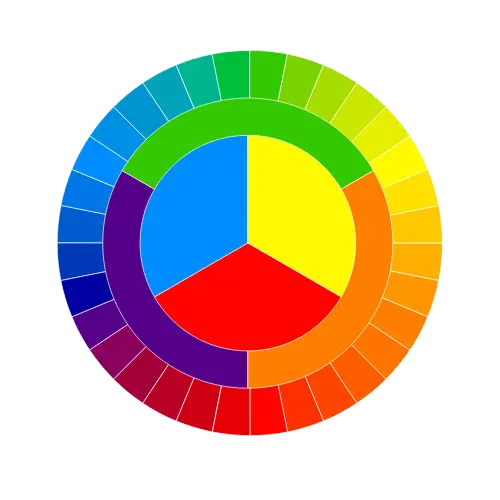
RGB (Red, Green, Blue) is the standard color model for digital screens. Every color you see on a monitor, phone, or TV is a combination of these three primary colors, each ranging from 0 to 255. RGB is additive—mixing all three at maximum intensity creates white. This is why our tool interpolates in RGB: it’s the language of screens.

Understanding RGB helps you predict how colors will mix. Pure red (255,0,0) and pure blue (0,0,255) always pass through purple (128,0,128) at the midpoint—no surprises.


Linear Interpolation in Design

Linear interpolation (LERP) is the mathematical process of finding values between two points. In design, it’s used for animations, transitions, gradients, and responsive scaling. When you create a smooth color fade, you’re witnessing LERP in action.

The formula is simple: start + (percentage × difference). This same principle applies to motion tweening, responsive font sizing, and data visualization gradients.


Hex Codes vs. RGB Values

Hex codes are just RGB values in a different format. #RRGGBB breaks down to:

  • First two digits: Red (00 to FF, or 0-255 in decimal)

  • Middle two digits: Green

  • Last two digits: Blue

Converting between hex and decimal is essential for any designer or developer. For example, #FF9933 = Red 255, Green 153, Blue 51. Understanding this relationship lets you tweak colors numerically, not just visually.


Color Theory Basics for Designers

Color theory explains how humans perceive and react to color combinations. While this tool handles the math, you still need to understand concepts like:

  • Complementary colors (opposite on the color wheel)

  • Analogous colors (adjacent on the wheel)

  • Color temperature (warm vs. cool)

  • Saturation and brightness

Use this generator to explore these relationships mathematically.


Creating Accessible Color Palettes

A beautiful palette is useless if people can’t read your content. Web Content Accessibility Guidelines (WCAG) require specific contrast ratios for text and interactive elements.

When using generated palettes, always check:

  • Text on background contrast (minimum 4.5:1 for normal text)

  • Focus states and hover indicators

  • Color-blind friendly combinations

Tools like contrast checkers complement this palette generator perfectly.


Gradient Design in Modern UI

Gradients have returned to mainstream design, appearing in buttons, backgrounds, illustrations, and data visualizations. Understanding how to build custom gradients gives you control over:

  • Visual hierarchy (bright colors attract attention)

  • Depth and dimension (simulating light and shadow)

  • Brand personality (bold vs. subtle transitions)

This generator helps you move beyond preset gradient stops to fully customized color progressions.

Faqs

How do I create a gradient between two colors?

Pick your starting color (Color A) and ending color (Color B) using the color pickers or hex inputs. Adjust the steps slider to control how many intermediate colors appear. The tool instantly generates the complete gradient palette.

The steps slider controls how many total colors appear in your palette. Minimum 2 (just your two colors), maximum 20 (18 intermediates + 2 endpoints). Each step is an evenly spaced color between your chosen endpoints.

Yes. Below each color picker is a hex input field. Type any valid hex code (e.g., #FF5733) and press Enter or click away. The swatch and color picker update automatically.

The tool uses linear RGB interpolation. For each color channel (red, green, blue), it calculates: start value + (position × difference). All channels are mixed independently, then combined into final hex codes.

RGB interpolation is mathematical, not perceptual. Human eyes perceive color changes differently across the spectrum. For perceptually uniform gradients, LAB color space is better—but RGB remains standard for screen design.

Absolutely. All generated colors are standard hex codes, fully supported in CSS, HTML, and all modern browsers. Use them directly in background-color, color, gradient() functions, or any CSS property.

Random generators create unrelated colors. This tool creates a FAMILY of colors—a logical progression from one color to another. Perfect for gradients, hover states, and brand extensions where consistency matters.

Yes, completely free. No account required, no usage limits, no hidden fees. All processing happens locally in your browser.

ADVERTISEMENT

ADVERTISEMENT